
Windows Pro Safety is a rogue antispyware that designed by cyber criminal to cheat less experience PC users into buying its so called licensed version to remove the virus and malware from your computer completely. Windows Pro Safety comes from the former versions like the one called Windows Pro Safety Release or Windows Safeguard Upgrade. When this rogue virus installed in your computer system, it will start to run itself automatically while you start Windows. Once start, this rogue program will display numerous false security alert stating that your computer is in a high threat and is infected with malware virus. In fact, this program is a malware itself. Windows Pro Safety aims to persuade victims into purchasing its licensed version to allegedly remove found malware threats. Actually, this rogue malware has no abilities to help victims to remove the virus. It is just rogue security software.
Published by on May 21, 2012 8:42 am and last modified on May 21, 2012 10:03 am.
Cannot delete Trojan:Festi by your antivirus software? Have tried a lot of methods but all failed eventually? You should be aware of the fact that no antivirus programs can deal with it successfully. And then follow the instructions here to make yourself an expert in removing this trojan virus.
Trojan.Fesiti is claimed to be a Trojan Downloader or Malware Dropper. Do not underestimate this piece of Trojan virus. According to many victims’ experiences, this nasty virus is quite aggressive. Why and how is that? Firstly of all, it can be spread through porno websites or spam emails from a familiar contact users. Antivirus software cannot prevent you from the infection when you are visiting illegal webpages. When the infection is done, it will create a new kernel driver so as to let itself boot automatically upon Windows start-up and also will change the structure of computer system. Second of all, as a trouble downloader, Trojan.Festi is connecting to a particular website for all the downloads. It will get a hacked file or forcibly redirect you to this malicious website. The download process starts right away without your approval when you land on there. It is like the original spring of all the viruses and bugs. What’s worse, a third party user will be enabled by this Trojan through backdoor activities to make entrance to your computer. It’s like a dangerous thief breaking into your house and take away whatever he wants. So without any doubt, you should get this nasty virus off your computer as soon as possible. Read the rest of this post »
Published by on May 20, 2012 7:22 pm and last modified on November 13, 2012 6:20 pm.
Alureon is a type of Trojan virus that is designed by cyber criminals to steal computer users’ personal data. The Trojan virus can follow the tail of a computer system’s network traffic and steal account information, passwords, online banking data and credit card number and so on. This is one of the most dangerous malware infections. The Trojan virus will damage your system files and make your system crash, once you get infected with this Trojan virus, your system be shown into threat and even users use antivirus delete it, it will come back to users’ computer in a minute. This is because Alureon Trojan virus is designed to escape the antivirus software. This Trojan virus will open a security hole that is used to download other malicious malwares. Before your computer is overrun with malwares, you need to remove Alureon from your computer immediately and completely. Manual removal is the most effective way to handle this Trojan virus.
Published by on May 17, 2012 2:55 pm and last modified on May 26, 2012 1:46 am.
Welcome to nginx , known as nginx error, is a redirected blank page when you search on web browser. When you attempt to open a web page, the page rerouted to Welcome to nginx! page. If your computer screen appear this page, your browser has been compromised by browser hijacker, rootkit or Trojans. This nasty virus will control your web browser such as Firefox, Internet Explorer, Opera or Chrome. And your search tools such as Google, Yahoo! and Bing are rerouted to the blank page—Welcome to nginx. Different from other browser hijackers, this nginx error prevents computer victims from opening other pages, and it associated with serve disordering. After victim infected with this virus, websites victims open will be replaced by a blank page with error message.
Published by on May 17, 2012 2:49 pm and last modified on November 13, 2012 5:49 pm.
Did you encounter a pop-up online scanner before that stated your computer was badly infected with numerous viruses and spywares? Did you take the recommendation and install this Windows Safeguard Upgrade fake antivirus software? Your computer must have been suffered from this rogue a lot. But don’t worry. You will find the answers on this virus here.
Windows Safeguard Upgrade comes from the fake Windows antivirus program family -Rogue.FakeVimes family. Sharing the same purposes with other Windows malware like Windows Secure Surfer, Windows Prosecurity Scanner and Windows Safety Module, this scam is created and used by online criminals to achieve their hideous intentions. Although the name has changed and the look seems to be a legitimate program, it’s just its way to fool around with you. Computer users should be aware of this malware immediately and ignore what it says. It is said to be an Internet crime that has been quite popular in modern society. Windows Safeguard Upgrade Virus Screenshot is below:
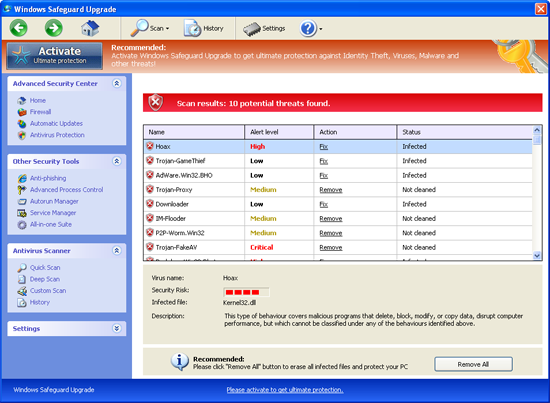
Windows Safeguard Upgrade Virus Protection can easily infect your computer with the help of trojan horses when you view some illegal websites or click on a spam email that contains unknown enclosure. But why do people still do that since they have already known it’s against the law? It’s the authentic antivirus applications which make them think that they could do that without taking any risks. The fact is, antivirus programs cannot remove this kind of spyware and some can’t even detect the viruses. When being infected at the first place, online scanning is run without your approval and strongly suggesting you should install this Windows Sleek Performance rogue to delete all the detected viruses, errors and malware. But do not believe any of that because none of them are truly existing. It’s just boasting you so that you may purchase the licensed version when finishing the installation. Once you have made the payment, nothing would happen except you will be losing a bunch of cash. Hence, it is suggested that you should totally ignore it and get it out of your computer in time. Read the rest of this post »
Published by on May 17, 2012 12:23 pm and last modified on November 13, 2012 6:18 pm.
Have you been redirected to a certain webpage all the time no matter what search engines you use or what sites you are supposed to get? After trying every way to uninstall it but it just shows up again and again? Take it easy, you will learn how to remove this annoying redirect virus by yourself.
Funmoods Toolbar is also known as a nasty browser hijacker even though it’s just a toolbar on your search engine. Computer users cannot be familiar with toolbars more. It can be called as a browser extension. Funmoods virus is just one of them but not a friendly and wanted one. The genius part is that it appears as normal as others and you can use it in online communicating and searching information. But be careful. Once you give it a try, you will be redirected to a certain page -startfunmoods.com virus which shows up as a common search engine. It is strongly suggested that you should stick to the search engines you are used to and do not use any unknown engines. As in this case, when you search via this scam webpage, an amount of pop-ups and ads will be showing constantly on your screen. Even though you have tried to uninstall it from the Add/Remove Programs function, it won’t come off your computer and will show itself again every time you reboot your computer. Most important, these bunch of pop-ups and redirect websites are full of viruses, bugs, malwares and other troubles that will take you forever to remove. Therefore, feel no doubt to remove this rogue toolbar out of your computer as soon as possible. Read the rest of this post »
Published by on May 16, 2012 8:29 am and last modified on November 13, 2012 6:16 pm.
Cyber blocking of computers? Is computer blocked by the West Yorkshire Police Virus? Are you prevented to do anything on your computer and the only thing you can get is a full locked screen saying that your computer has been legally locked due to the illegal activities you have just done? Is there a fine involved if you want to unlock the PC? How to Unlock A PC and Files Locked by West Yorkshire Police Ukash Virus? Do not panic. This is a scam virus which has nothing to do with the real police or government and your computer will be fine when you finish this reading.
West Yorkshire Police Virus is a nasty ransomware that has been quite active and persistent for a long period of time. This deceitful pop up warning message on your computer screen, which claims to be legit and authorized proved, is in fact having nothing to do with the government or police but instead is conducted by cyber criminals to blackmail innocent PC users. It is similar to the Royal Canadian Mounted Police (RCMP) Virus which attacks computer users mostly from Canada. Surveys show that the population of its victims has been increased and the range is expended to more European countries including England, France, Germany, Ireland, Scotland, Netherlands, Spain, Italy ect. We believe the United States is also under the list of targeted country now. Same as the Metropolitan Police Virus, this fake police warning message (also known as the West Yorkshire Police Ukash Virus) plays the same trick as requesting money from victims via locking up their computers and scaring them with illegal issues that they have not done. As most users cannot do anything with their computers at all, this virus always wins the game. People are now warned to not believe this West Yorkshire Police Ukash thing or a single word it says.
Read the rest of this post »
Published by on May 16, 2012 8:20 am and last modified on February 26, 2014 12:11 pm.
Is your computer suffering from Trojan:Win64/Sirefef.Y virus? Your antivirus program cannot get it off your computer? It should be removed manually as only in this way it is a complete removal. Follow the instructions here to make yourself an expert in removing this trojan virus.
Trojan:Win64/Sirefef.Y Virus is a member of the Trojan serial family. Do not underestimate this small virus. Many other malwares and viruses could get along with trojan virus into users’ computers with the help of it in backdoor activities. Thus, its goal is to help as many badwares as possible to install in victims’ computers and do further damages and deceive money. To achieve that, the popular way is to inject rogue codes into the computer system and allow remote hackers to take control all over. Your computer will be very dangerous when being controlled as somehow you don’t own this computer any more. Besides, this trojan horse will also change your Internet settings and even redirect all your searching results to hundreds of malicious websites. It is like the evil origin of all the troubles within your computer. So without any doubt, you should get this nasty virus Trojan:Win64/Sirefef.Y off your computer as soon as possible. Read the rest of this post »
Published by on May 15, 2012 2:25 pm and last modified on November 13, 2012 5:25 pm.
Suffered from great pain due to Description of Bloodhound.Olexe.2? Are you mad about your PC performance and system crash? Read this post and learn how to get rid of the nasty Trojan infection completely.
Bloodhound.Olexe.2 is malicious Trojan infection discovered by Norton Security System recently. The latest discovered Trojan threat is really aggressive and harmful in that it can causes your infected PC frequent freezing and system crash. In fact, it is a new PC Security Alert for Windows PC users with great hazardous power. The nasty Trojan threat can install automatically and launch many malicious activities secretly in your computer on purpose. It is designed to infect your PC to steal your personal sensitive information and security. It also can hide itself with many other malicious PC threats such as malware, spyware and adware parasites, etc. in your system settings, registry settings, processes, program files, dll files to collect further important information. Moreover, the Bloodhound.Olexe.2 Trojan can penetrate into your PC system and find out all exe files in your hard drives. When the exe processes are running, the virus could inject its codes into their address spaces to activate many dirty actions. Once infected, your PC performance is very bad and your files are ruined terribly. When you surf the Internet, your specified websites will be redirected to those unwanted and risky web pages. And annoying advertisements keep popping up on your screen to entice you to download free software, games and videos and so on. Don’t trust those malicious contents. Instead, remove the Bloodhound.Olexe.2 virus from your PC as soon as possible. Read the rest of this post »
Published by on May 15, 2012 4:25 am and last modified on November 13, 2012 5:47 pm.
Have been infected with Windows Secure Surfer rogue and required for money for the “licensed” version so as to remove all the threats? Have tried every antivirus applications and none of them work? This malware should be removed manually and immediately out of your computer before more dangerous consequences happen.
Windows Secure Surfer is known as one of the fake antivirus programs from the Rogue.FakeVimes family. This scam as usual has a trustworthy but deceitful look and pretends to be a legitimate PC system protection software. But the intention is always the same–to get your money out of your pockets. It is said to be an Internet crime that has been quite popular in these days.
Windows Secure Surfer rogue will boast to you that it can help to remove malware and viruses found in your computer, optimize and speed up your computer system. The most popular way to be infected is via the help of trojans in system backdoor activities. Once being infected, no antivirus applications can remove it and it will just appear each time after you reboot the computer. Lots of pop-ups will show on your desktop. Windows Secure Surfer will run a fake checkup through your computer as soon as the reboot is done. Then it states your computer is full of critical errors, viruses and malware and other problems that will do harm to the system. But none of the above is truly existing. By saying that, this bad malware will strongly recommend itself to you as a authentic malware remover. After the installation, you will be asking money to pay for the full version of it so that it can completely help you remove all the detected errors and bugs etc. Even if you do make the payment, it is not only useless in removing those viruses, but may cause a lot more damages to your system. Therefore, it is the best option to not believe in it and to realize that it should be removed without any doubt. Read the rest of this post »
Published by on May 14, 2012 6:44 am and last modified on November 13, 2012 6:12 pm.




