
Trojan.zeroaccess.B is categorized as a horrible Trojan infection that can produce malicious code into the infected computer and create registry entries to run every time your computer starts. It even drops random malware into Windows Temp folder to mess up the whole computer system. It always come bundled with Trojan.Gen.2 once installed.
This virus can hide itself in the deep of an infected computer. It will be difficult for users to get rid of it by running antivirus programs. Ever time they reboot the computer after removal, the virus will still be back again when rescan the computer. Antivirus may report the infected file is located in C:\windows\assembly\temp\u\80000000.@, but you will find nothing related to the virus there. The virus has the ability to steal your confidential data, such as username, passwords and bank details. It can also perform lots of dangerous activities such as display annoying ads, slow down PC performance. Trojan.zeroaccess.B compromises the PC’s firewall to allow hacker access and download other malware to the system which causes your PC in great danger. It should be removed as soon as possible to avoid further damage.
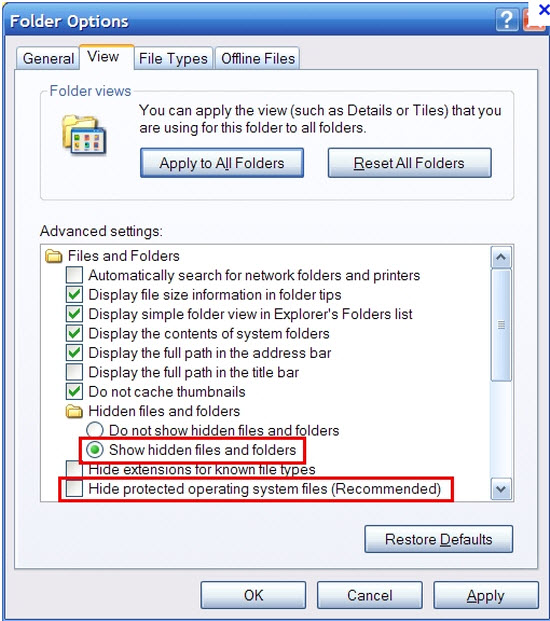
1. Show hidden files and folders.
Open Folder Options by clicking the Start button, clicking Control Panel, clicking Appearance and Personalization, and then clicking Folder Options.
Click the View tab.
Under Advanced settings, click Show hidden files and folders, uncheck Hide protected operating system files (Recommended) and then click OK.
2. Open Registry entries. Find out the malicious files and entries and then delete all.
Attention: Always be sure to back up your PC before making any changes.
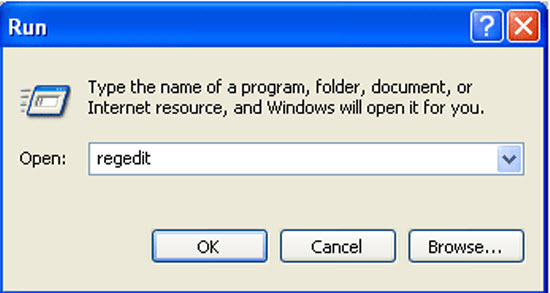
a. Press the “Start” button and then choose the option “Run”. In the “Open” field, type “regedit” and click the “OK” button.
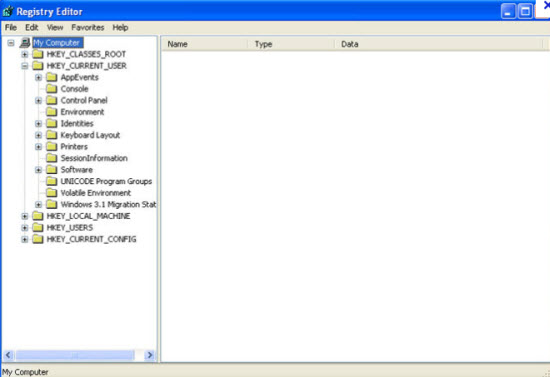
b. All malicious files and registry entries that should be deleted:
%AllUsersProfile%\Application Data\.dll
%AllUsersProfile%\Application Data\.exe
HKEY_LOCAL_MACHINE\SOFTWARE\Microsoft\Windows\CurrentVersion\Run “[random].exe”
HKEY_LOCAL_MACHINE\SOFTWARE\Microsoft\Windows NT\CurrentVersion\Winlogon\Shell
If you failed to remove this malware with the instructions above or need any assistant, you are welcome to contact YooCare experts to resolve all the problems completely.
Published by on July 21, 2012 10:55 am, last updated on July 21, 2012 10:55 am





Leave a Reply
You must be logged in to post a comment.